

No more copy-pasting or tab-switching. Anthropic’s AI now reads, writes, and edits directly inside your Google Docs, Sheets, and Slides—and vice versa.
- Bidirectional Integration: Claude now operates as a native sidebar within Google Docs, Sheets, and Slides, while also allowing you to open and edit those same Google files directly from the Claude chat interface.
- Context-Aware Capabilities: Whether writing complex Python-backed formulas in Sheets, ensuring visual alignment in Slides, or rewriting executive summaries in Docs, Claude reads your open file and selected text to make precise, in-place edits.
- Enterprise-Ready and Secure: The integration retains all your connected tools (like Salesforce), custom skills, and robust enterprise controls, all while strictly adhering to your existing Google sharing permissions.
The modern workflow is often a fragmented dance of endless browser tabs, where professionals constantly copy text from an AI chatbot, paste it into a document, and spend precious minutes reformatting. That friction is officially a thing of the past. Anthropic has bridged the gap between artificial intelligence and daily productivity with the launch of Claude for Google Workspace. Currently in public beta for all paid Claude plans, this powerful integration brings Claude directly into your Google files, fundamentally transforming how teams create, edit, and collaborate.
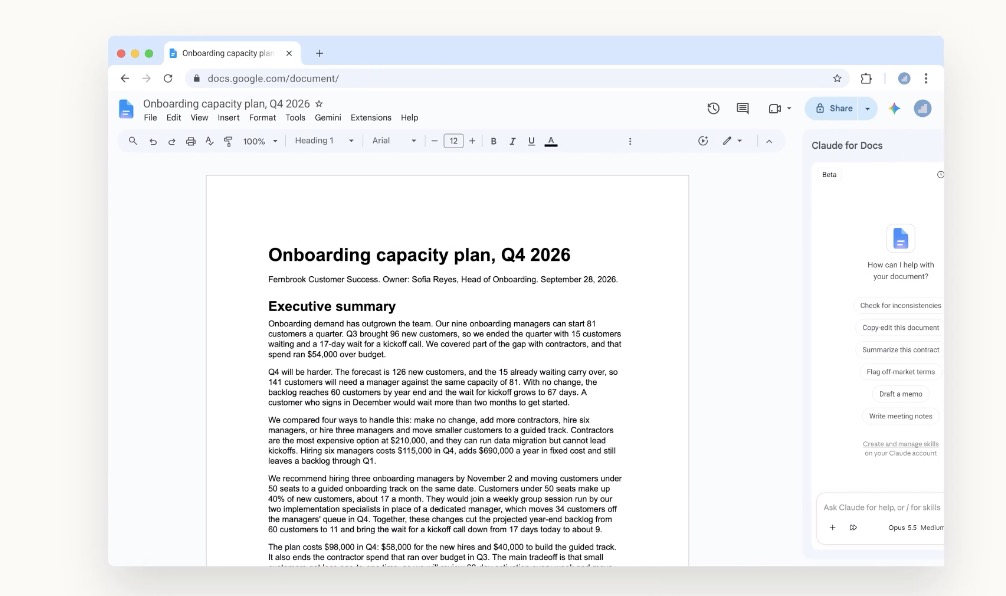
At the heart of this update is the new Claude add-on, which places the AI in a convenient sidebar right next to your active file. By living where you work, Claude eliminates the need to context-switch. It doesn’t just sit there; it actively reads the document, spreadsheet, or presentation you have open, recognizes exactly what text, cells, or slides you have selected, and executes changes directly within the file itself.
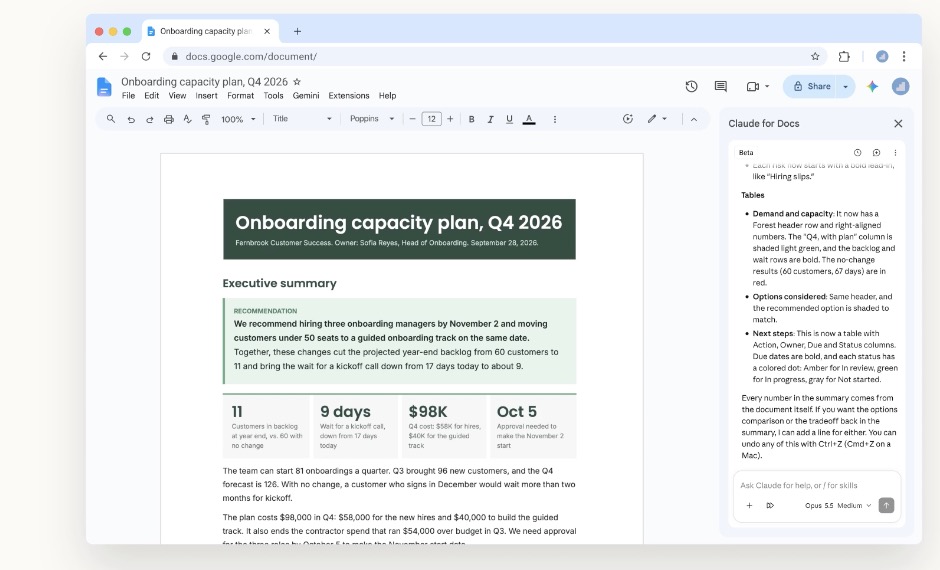
The capabilities adapt intelligently to the medium you are working in. In Google Docs, Claude acts as an expert editor. It can fix a single sentence or restyle a heading perfectly in place without disrupting your surrounding formatting. For more comprehensive overhauls, Claude proposes edits via intuitive suggestion cards in the sidebar, highlighting the exact passages it intends to change and letting you apply or dismiss them. You can simply ask Claude to tighten an executive summary and convert the next steps into a neatly formatted table, and watch it happen live on the page.
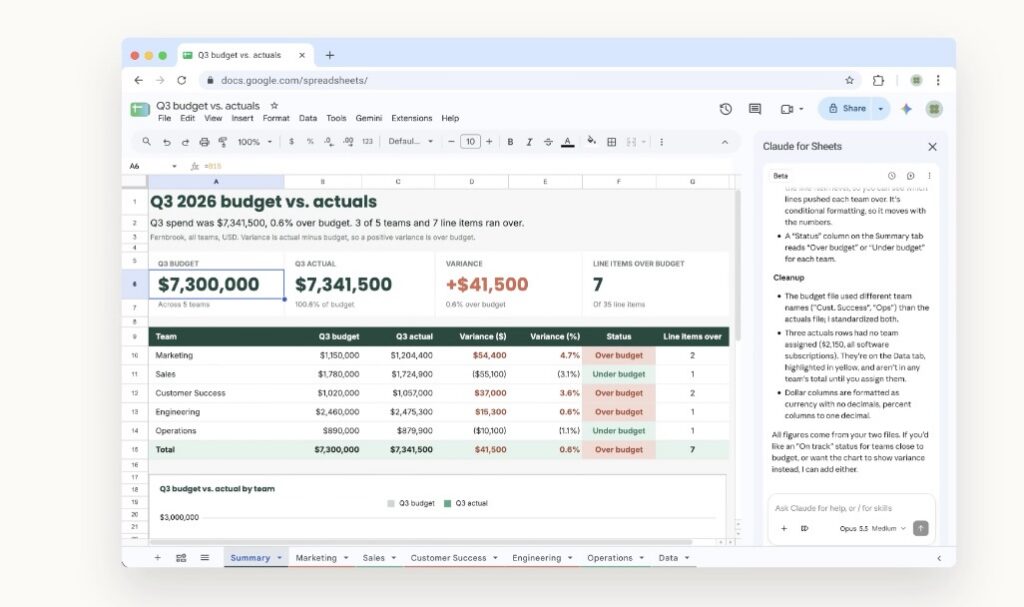
In Google Sheets, Claude transcends basic data entry to become a fully-fledged data analyst. It can write formulas, build pivot tables, generate native Sheets charts, and seamlessly add new tabs. For heavier lifting, such as data joins or intricate data cleaning, Claude can actually pull a specific range of cells into Python, process it, and write the pristine results back into your sheet. Imagine starting with a blank sheet, attaching your source files, and asking Claude to generate a Q3 budget versus actuals report—complete with individual team tabs, a summary chart, and automated flags for anything over budget.
Google Slides users will find a meticulous design assistant in Claude. The AI can build entirely new slides that perfectly match your deck’s existing layouts and themes. Crucially, it double-checks its own work, flagging elements that might overlap, run off the edges of the slide, or contain text that is simply too difficult to read.
Despite this incredible autonomy, you remain firmly in the driver’s seat. The integration features two distinct modes. In the default “Ask before edits” mode, Claude generates an approval card summarizing its intended changes, waiting for your green light before touching the file. If you prefer a faster workflow, you can toggle to “Accept all edits” mode, allowing Claude to work through the task and apply changes without pausing for permission.
This frictionless experience doesn’t sacrifice the advanced infrastructure enterprise teams rely on. When signed in, the sidebar brings along the exact same models, connectors, and custom skills you use in the standalone Claude app. For example, if you need to build a quarterly business review (QBR) for a client, Claude can seamlessly pull account history from your Salesforce connector and recent call notes via Google Drive, synthesizing it all directly into your presentation. If you save that specific QBR format as a “skill,” your entire team can effortlessly replicate the process for future decks. Furthermore, Enterprise plan users maintain critical security controls, including the Compliance API, customer-managed encryption keys (CMEK), and OpenTelemetry audit exports.
The integration is a two-way street. Alongside the add-on, new Google Docs, Sheets, and Slides connectors (also in beta) allow you to initiate the workflow directly from the Claude interface. By simply pasting a Google file link or asking Claude to spin up a new document, the file opens in a dedicated pane right beside your conversation. This is particularly ideal for starting new projects from scratch or managing work that spans across multiple files, all while strictly adhering to your existing Google sharing permissions.
Getting started is straightforward. Claude for Google Workspace is available now for all paid plans. Users can install the add-on from the Google Workspace Marketplace, open a file, and navigate to Extensions > Claude > Open Claude. For organizations, admins can easily deploy the add-on to their entire domain or targeted groups via the Google Admin console. To unlock the reverse workflow and edit files from within Claude, users simply need to turn on the respective connectors, though Team and Enterprise accounts will require an owner or primary owner to enable this feature first. With these tools in hand, the boundary between chatting with an AI and actually getting work done has finally disappeared.