

With massively upgraded agent capabilities and seamless native support for OpenAI’s Codex, the DeepSeek-V4-Flash API public beta sets a new standard for developers.
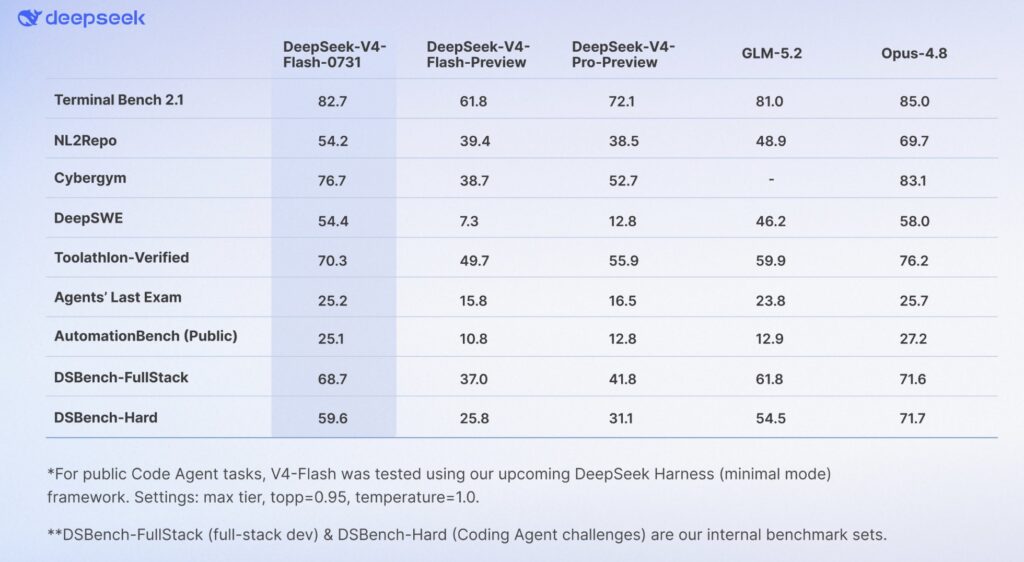
- Agent Capabilities Supercharged: The official DeepSeek-V4-Flash API is now live, boasting massive upgrades that allow it to comfortably surpass the V4-Pro-Preview in benchmark scores.
- Flawless Codex Integration: By natively supporting the Responses API format, the new model plugs directly into Codex CLI, the ChatGPT desktop app, and VS Code via a unified configuration.
- Safety-First Automation: A robust one-click setup script handles the entire installation—backing up files, declaring model metadata, and preserving custom environment settings without breaking existing workflows.
The landscape of artificial intelligence is moving at breakneck speed, and for developers, having an agile, responsive, and highly capable AI coding assistant is a necessity. Meeting this demand head-on, the DeepSeek-V4-Flash Official API has officially launched into public beta. This release is not just a minor patch; it represents a massive leap forward in agent capabilities. By refining how the model interacts and solves complex problems, the benchmark scores for the V4-Flash have skyrocketed, remarkably surpassing even the V4-Pro-Preview. What makes this feat even more impressive is that the DeepSeek-V4-Flash-0731 maintains the exact same model architecture and size as its preview version, proving that optimized agent behaviors and API enhancements can unlock staggering amounts of latent power.
A major focal point of this release is interoperability. The official V4-Flash now natively supports the Responses API format, ensuring it is fully adapted for Codex, OpenAI’s premier AI coding assistant. Because Codex communicates with models via this standardized Responses API, DeepSeek’s native support means developers can weave this powerful model directly into their existing workflows without friction. Whether you prefer working in the Codex CLI, the ChatGPT desktop application, or utilizing the Codex IDE extension for Visual Studio Code, the integration is perfectly unified. All of these clients share a single configuration file (~/.codex/config.toml), meaning you only need to configure DeepSeek once to have it instantly available across your entire development environment.
To make this transition as smooth as possible, the development team has introduced a highly recommended one-click setup script. Before running this automated tool, developers simply need to ensure that their Codex CLI or ChatGPT desktop app has been launched at least once, which generates the necessary foundational directory (~/.codex). Upon running the script, users are greeted with a menu to select their desired model and are prompted to input their unique API key (starting with sk-), which can be obtained straight from the DeepSeek Platform. From there, the script takes over, handling the technical heavy lifting with a strong emphasis on user safety and system stability. You can even run the script again at any time to switch models from the menu or select option 3 to completely restore your configuration to its pre-installation state.
The automation provided by the setup script is both thorough and transparent. First, it safeguards your current environment by backing up your existing configuration to a dedicated backup folder (~/.codex/backup-deepseek/), allowing for a stress-free restoration if needed. Next, it writes a model catalog (~/.codex/models.json) that formally declares the metadata of DeepSeek models—such as context window sizes, supported reasoning effort levels, and tool call formats—so Codex can interact with DeepSeek exactly as it does with its own built-in models. The script then carefully modifies the core configuration file by adding the required [model_providers.deepseek] section. It is intelligent enough to preserve your custom settings, like MCP servers and project trust levels, while actively removing and printing the reasons for any conflicting fields. Crucially, the entire process is validated for syntax errors before a single file is written; if validation fails, the script aborts immediately without modifying anything.
For those who prefer a hands-on approach, there is also an option to edit the configuration files manually. By creating the model catalog file yourself, you can declare the exact metadata required for both the deepseek-v4-flash and the deepseek-v4-promodels to Codex. It is important to note that today’s sweeping upgrades apply exclusively to the DeepSeek-V4-Flash API. The DeepSeek-V4-Pro API and the corresponding App and Web models remain unchanged for the time being. However, the horizon is incredibly bright. With the official release of DeepSeek-V4-Pro coming as soon as possible, developers are encouraged to configure their environments using the detailed official API docs today and stay tuned for the next massive leap in AI coding capabilities.