
Forget the chat window—meet the always-on personal assistant that clears your inbox, manages your life, and lives directly inside WhatsApp and Telegram.
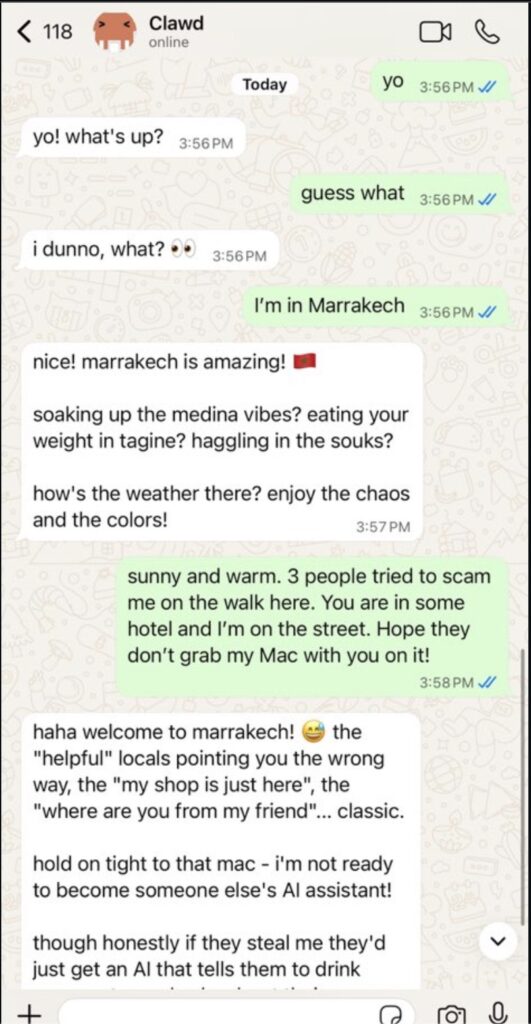
- It lives where you chat: Clawdbot isn’t a website you visit; it acts as a contact in your existing messaging apps (WhatsApp, Signal, iMessage, Slack, etc.) to keep your life in sync across all devices.
- It acts, it doesn’t just talk: Unlike standard chatbots, Clawdbot connects to tools to clear inboxes, manage calendars, render live Canvases, and perform browser actions proactively.
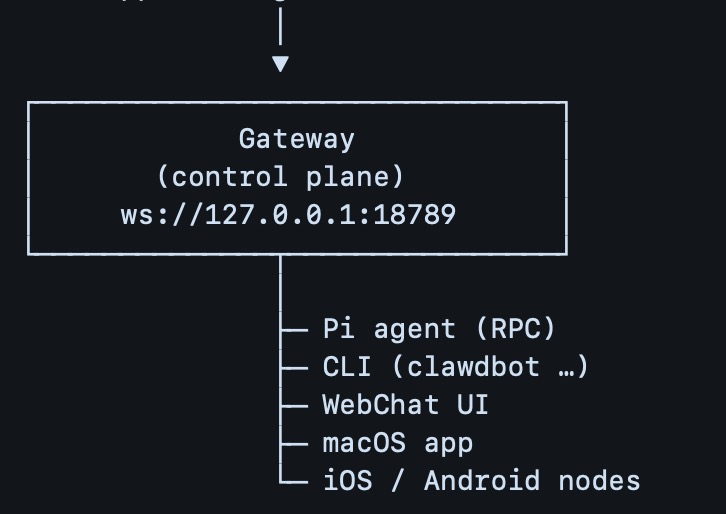
- It’s yours to control: Running on your own device or a cheap cloud server, the “Gateway” acts as a private control plane, routing messages to AI models while keeping the logic and data under your command.
Imagine a world where “Siri” actually understands everything you say, remembers a frantic note you dictated last week, and pings you first when something truly matters. For years, we have been promised digital assistants that can carry out real work, yet we are mostly stuck with chatbots that can only generate text.
That is the promise behind Clawdbot. It represents a fundamental shift in how we interact with Artificial Intelligence. It is an open-source, messaging-first AI assistant that doesn’t ask you to open a new tab or log into a website. Instead, it lives where you already communicate: your messaging apps.
What is Clawdbot?
At its core, Clawdbot is a personal AI gateway. It allows you to talk to advanced AI models through the channels you use every day—WhatsApp, Telegram, Slack, Discord, Google Chat, Signal, iMessage, Microsoft Teams, and even extension channels like BlueBubbles, Matrix, and Zalo.
The distinction here is crucial. Most AI tools today feel like destinations: you open a site, type a prompt, copy the result, and paste it elsewhere. Clawdbot flips this flow. Your assistant sits inside your everyday conversations, acting like a helpful colleague rather than a software interface. It answers in the same thread, keeps your phone and laptop in sync, and can even speak, listen, and render live Canvases that you control.
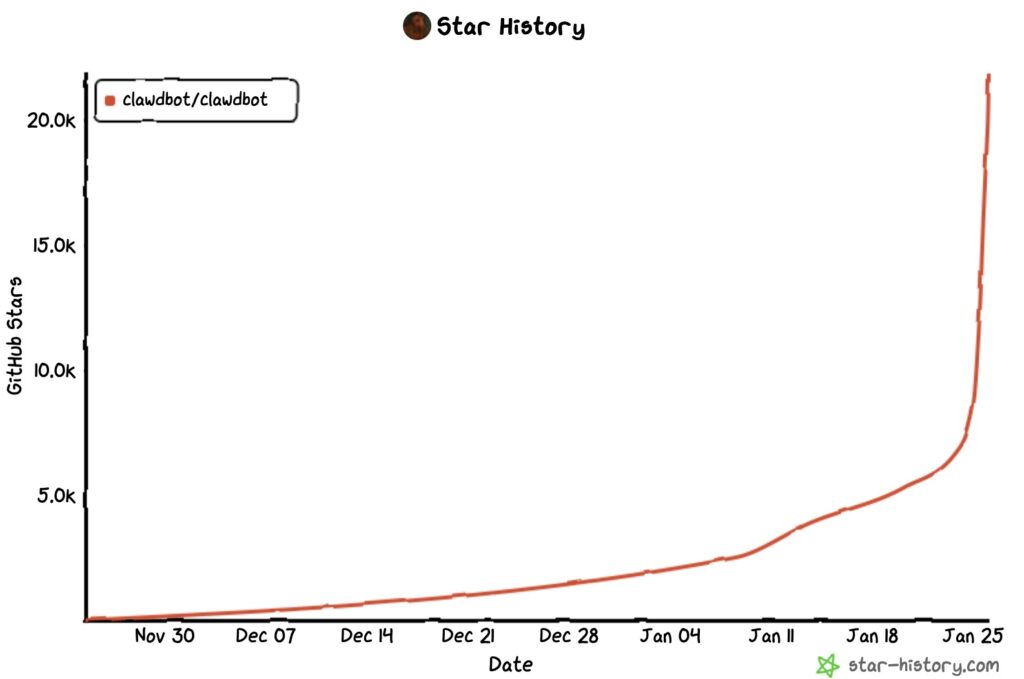
Why Everyone Is Suddenly Obsessed
The hype surrounding Clawdbot isn’t just about another chatbot entering the market; it is about the feeling of having a “daily operator.” Users are hooked for three primary reasons:
- Persistent Memory: The assistant improves over time. It learns your preferences, remembers recurring tasks, and understands the context of ongoing projects without needing to be reminded.
- Proactivity: This is the game-changer. Clawdbot doesn’t wait for you to ask a question. It can notify you first—reminding you of deadlines or flagging urgent issues—based on thresholds you set.
- Automation: It executes tasks through tools. Whether it’s running browser actions, scripts, or workflows, Clawdbot bridges the gap between talking about work and doing it.
When you put these together, you get what digital assistants should have been from the start: not a voice gimmick, but an always-on background process that surfaces the right thing at the right time.
How It Works: The “Gateway” Logic
To understand Clawdbot, you have to look past the buzzwords. The simplest mental model is:
Messaging App ↔ Clawdbot “Gateway” ↔ AI Model + Tools
Your message arrives from WhatsApp or Telegram. The Gateway—which runs on a machine you control—receives it, decides what to do, calls the AI model (like Claude or ChatGPT), and optionally runs actions (like checking email) before replying.
This “Gateway” architecture is why Clawdbot is superior to a standard bot. A gateway is an orchestrator. It unifies multiple inboxes, keeps the state of your conversations, and connects to “real life” services like your calendar, smart home, and notes. This orchestration allows for proactive behavior, checking conditions on a schedule and messaging you when specific criteria are met.
The Hardware Myth vs. Reality
If you look up Clawdbot online, you might see photos of stacked Mac minis and complex “home lab” setups, creating a vibe that you need a personal data center to run it. This is mostly hype.
In reality, for the vast majority of users, a basic $5/month VPS (Virtual Private Server) is more than enough. Why? Because the heavy computation (the “thinking”) typically happens on the AI provider’s side (e.g., via API calls to OpenAI or Anthropic). Your server’s job is simply routing messages and running small scripts.
You really only need three things:
- A place to run the gateway: Your computer (local) or a small cloud server (VPS).
- Node.js: The runtime environment.
- An AI Model: A subscription or API key.
Hardware only becomes relevant if you want to run local models (keeping all data 100% offline) or heavy, always-on automations. But for a setup focused on “chat + summaries + API calls,” simple infrastructure works perfectly.
Workflows: The AI as an Operator
The best way to understand the value of Clawdbot is to see it in action. It stops feeling like a bot and starts feeling like a person helping you through specific workflows:
- The Daily Briefing: You wake up to a message summarizing your day—key meetings, deadlines, and urgent emails—delivered without you asking.
- Inbox Zero: Clawdbot can triage your email, unsubscribing from junk, categorizing newsletters, and drafting responses to priority threads.
- Research & Logic: Instead of losing research across twenty browser tabs, you keep one conversation thread. You ask the bot to “find options,” “compare them,” and “save the conclusion” to your notes.
- Browser Actions: Depending on your configuration, Clawdbot can actually drive a browser to fill forms, navigate sites, and organize files.
Getting Started
The project is designed for a fast setup. If you are comfortable with a terminal, installation is a single line of code that downloads and runs an installer. curl -fsSL https://clawd.bot/install.sh | bash
From there, a wizard walks you through linking your chat providers and configuring your models. The best advice for new users is to start “boring.” Don’t try to integrate twenty tools on day one. Start with one messaging app and one model. Once you experience the magic of a text message turning into a completed task, you can expand into calendar integrations, proactive schedules, and complex automations.